Chadrack

In the last three years or so, I've used several AI tools across my affiliate sites basically for writing content. However, in the last few months the question about AI has moved from, what can AI do to what tasks can I give AI? And now, it is entering, can AI actually get the job done?
This is where Foenix.ai comes in. Unlike other AI tools for WordPress sites, Foenix.ai does not just give you a chat box, or another writing box, it gives you four AI WordPress agents that actually operate the website. You give it the job and it gets the job done!
For me, this is powerful because all my affiliate sites are built on the WordPress platform. After writing every article there’s a whole lot of work I still need to do. And I must say it has never been easy. But now, Foenix.ai is promising to ease that day-to-day WordPress work — link audits, page builds, SEO fixes, content refreshes. And, after running it inside a sandbox, I think that promise is truly powerful.
In this Foenix.ai review, I’ll examine what the platform actually does, how its AI agents work, what its autonomy levels mean, how the credit system affects your costs, and how safely you can use it on an affiliate site.
I’ll also look at its strengths, limitations, and practical use cases for affiliate marketers.
Key Takeaways
- Foenix.ai is an AI agent for WordPress, not simply an AI content writer.
- Its main advantages include site-level automation for SEO tasks, internal linking, page building, content updates, and scheduled maintenance.
- Affiliate marketers can use it to reduce repetitive WordPress work, but it does not replace keyword strategy, product research, editorial judgment, or quality control.
- The safest approach is to start with its sandbox or staging environment, test low-risk tasks, and keep important money pages under human review.
See What Foenix.ai Can Do on Your WordPress Site
Don't take our word for it. Start with the free 500-credit sandbox and test Foenix.ai on a low-risk WordPress environment before connecting your live site.
DISCLOSURE: WebIncomeJournal is supported by readers like yourself. We may earn an affiliate commission when you purchase through our links, which helps us offer our content for free. Learn more here.
What Is Foenix.ai and How Does It Act as an Autonomous WordPress Agent?
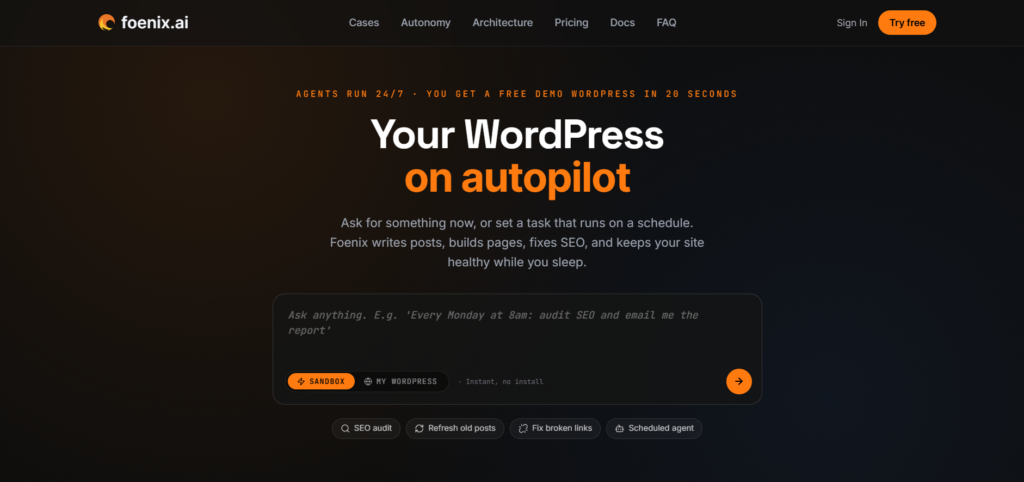
Foenix.ai is an AI agent for self-hosted WordPress sites that can operate the website instead of simply generating text for you. Traditional AI writing tools stop at the draft. An AI WordPress agent goes further: it reads your database, templates, and plugins, then executes real site-administration tasks in plain language.
The key shift here is from using AI for WordPress to using an AI agent to run your site. Traditional AI writing tools usually stop at the draft. You still have to copy the content into WordPress, format it, add links, adjust elements, and manage the supporting site work. Foenix.ai is built to reduce that context switching by working with your WordPress content, themes, plugins, and site environment.
This is the operational shift worth understanding before anything else. The market moved from “AI for WordPress” (tools that help you write about WordPress) to “AI agents that can operate WordPress” (tools that log into WordPress and do the work).
Three things make this practical for a working affiliate site:
- No more context switching. Foenix removes the standard friction of living inside the wp-admin dashboard: fewer open tabs, less manual CSS, fewer plugin conflicts.
- Background operations. Once you start a command, the agent keeps working even after you close your browser.
- Plain-language control. You describe the task; the agent maps it to actual WordPress, PHP, and plugin actions.
How to Test It for Yourself
You can begin with the free sandbox rather than connecting the agent to your live site.
- Create an account. The free plan provides 500 credits without requiring a credit card.
- Launch the sandbox. Foenix spins up a ready-to-use WordPress sandbox on its own servers in 10 to 20 seconds.
- Run a conversational command. In the chat window, type: “Where is the contact form submission handled?” This lets you test whether the agent can understand your WordPress environment before allowing it to make changes.
The sandbox is the right starting point because it lets you evaluate an AI WordPress agent without immediately putting a live affiliate site at risk.
Ready to see the difference between an AI writer and an AI agent?
Start a free Foenix.ai sandbox and give it a simple WordPress task. You can test its ability to understand your site before allowing it to make changes.
Why Is This Foenix.ai Review Critical for Affiliate Marketers?
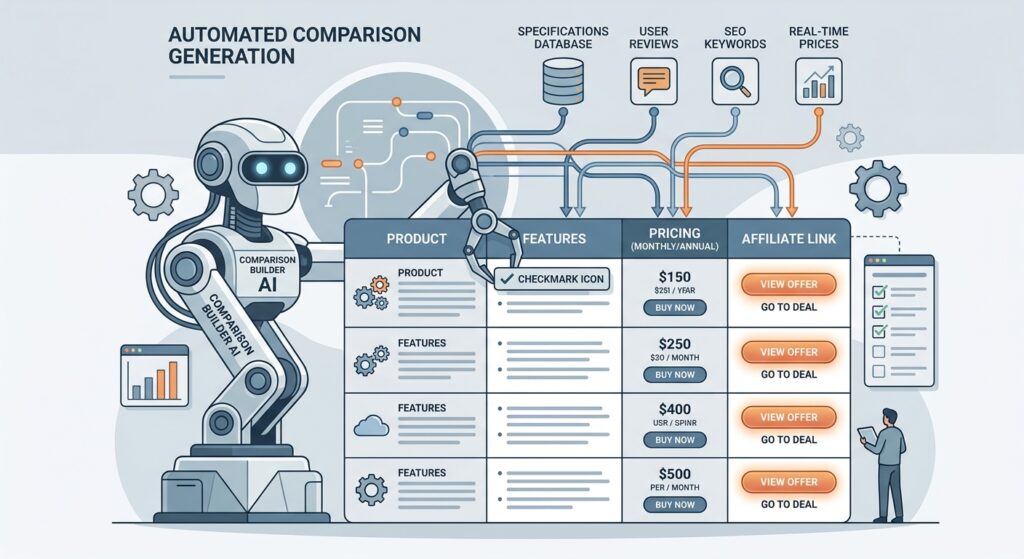
Foenix.ai matters to affiliate marketers because the biggest bottleneck is often no longer content creation – it is maintaining everything around the content. An affiliate portfolio can contain hundreds of articles, comparison pages, internal links, affiliate URLs, SEO fields, images, and site elements that require ongoing attention. Foenix.ai targets that operational workload directly.
Think about what happens after publishing a review. Product pricing changes. A merchant updates its features. An affiliate link stops working. An older article loses internal-link opportunities. A comparison page needs another product. These small tasks accumulate quickly.
This is where WordPress automation AI can provide practical value. After a careful look at the platform, I think this truly changes the economics of managing a portfolio of affiliate sites. Instead of spending your time inside the WordPress dashboard performing repetitive operations, you can describe the task and let the AI agent handle the mechanical work while you retain control over strategy and final decisions.
And for me, I’m looking to use it for the following in the coming days:
- Building product comparison pages.
- Auditing and repairing internal links.
- Updating older content.
- Checking SEO issues.
- Creating WordPress pages.
- Generating and modifying site elements.
- Running recurring site-maintenance tasks.
I’m really thrilled that Foenix works inside my existing tool stack. For example, it integrates natively with Rank Math, populating focus keywords and drafting metadata instead of asking me to do it after posting that article.
A Practical Affiliate Comparison-Page Workflow
Because a comparison page combines research, structure, formatting, and WordPress implementation, I decided to test-run the tool with an example. Here’s what I did:
- Open a sandbox environment. This is the safest route to take because I didn’t want to give access to any of my sites for now.
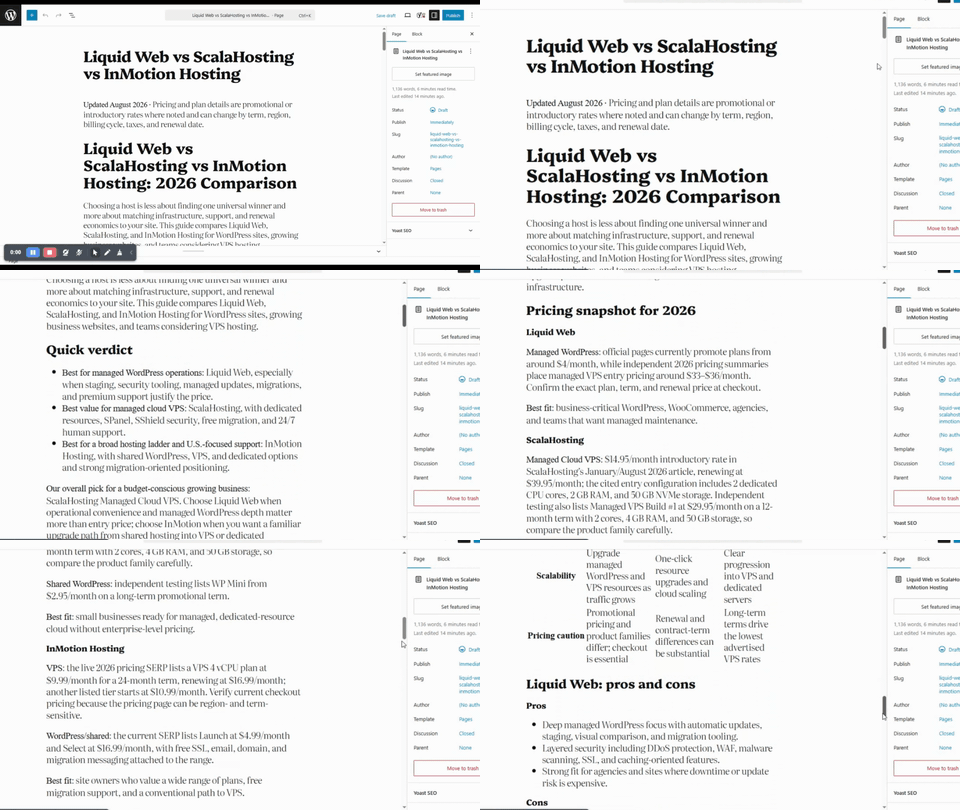
- Give Foenix a specific instruction. I simply used the example on the official site but changed the products. Here’s what I gave it: “Create a product comparison page for LiquidWeb Hosting, ScalaHosting, and InMotion Hosting. Use live SERP analysis for current 2026 pricing and features. Insert pricing tables, pros and cons lists, and a responsive HTML comparison table. Save the post as a draft.”
- Add affiliate CTAs. Instruct the Coder agent to insert your approved affiliate tracking links and CTA HTML into the draft.
Below is the comparison post that Foenix.ai wrote. For a first draft, I think the content is good but it definitely need some editing, which I think is not out of place. Besides, for this test I used the Lite mode instead of the Plus Mode that is recommended for the highest formatting and coding accuracy.
Spend Less Time Maintaining Your Affiliate Sites
Broken links, outdated content, internal-link audits, SEO checks, and repetitive WordPress tasks can consume hours every month. Foenix.ai lets you test whether an AI agent can take some of that operational work off your plate.
How Does Foenix.ai Safely Execute WordPress SEO Tasks?

Foenix.ai uses a Multi-Agent System (MAS) to divide WordPress tasks among four specialized AI agents instead of relying on one model to plan, code, and verify everything. This architecture adds a verification stage to tasks that can modify WordPress code, content, layouts, and SEO elements. However, this is only a safeguard not a guarantee that every automated change will be correct or safe.
The workflow consists of four roles:
| Agent | Primary responsibility |
| Orchestrator | Routes the task and manages execution and credit requirements |
| Architect | Understands the site context and breaks larger requests into steps |
| Coder | Executes WordPress-side changes, including PHP operations |
| Verifier | Tests the result and determines whether the task passes or fails |
The Verifier is the key safety mechanism. If it returns a “FAIL” result, the Orchestrator can prevent the failed approach from being deployed and retry the task using another strategy. This self-correction loop is particularly useful when an AI agent is working with WordPress code or site structure.
But there is an important limitation.
Foenix.ai does not eliminate the risks associated with autonomous WordPress changes. The official documentation specifically notes that rollback capabilities are still under development and may not always be available. It’s important, therefore, that you maintain your own backup and test significant changes in a sandbox or staging environment first.
How to Test Automated Internal Linking Safely
Use a review-first workflow before allowing Foenix.ai to modify your internal links.
- Give the agent a restricted instruction: “Check internal linking on all posts. Suggest semantic internal linking opportunities but do not apply them without my review.”
- Review every recommendation. Check the proposed anchor text and destination for genuine topical relevance.
- Reject weak connections. Remove generic, forced, or duplicate internal-link suggestions.
- Approve only the useful changes. Once reviewed, allow the Coder agent to apply the approved links in WordPress.
This approach gives you the efficiency of AI internal linking while keeping editorial control over your site's topical structure, anchor text, and important pages.
What Are the Four Levels of the Foenix Autonomy Spectrum?
Foenix.ai's four autonomy levels let you choose how much control the AI has over your WordPress site. This matters greatly for affiliate marketers because not every task carries the same risk. A blog draft and a live pricing table do not belong at the same autonomy level. Also, a site-health report can be suitable for scheduled automation, while changes to an affiliate site's highest-converting review page deserve considerably more human control.
The four levels are:
- Level 1 – Conversational (Chat, 0% autonomy): Ask questions about your files, templates, hooks, plugins, or site structure. The agent analyzes the environment but does not modify it.
- Level 2 – Visual (Click-to-Edit, 25% autonomy): Select an element on the site, describe the desired change, and review the proposed modification before applying it.
- Level 3 – Generative (Build, 50% autonomy): Describe a larger development task, such as a landing page, WooCommerce page, or custom plugin, and Foenix builds it.
- Level 4 – Autonomous (Scheduled, 100% autonomy): Create a recurring instruction and schedule, allowing the agent to perform the task automatically.
How to Set Up a Scheduled Agent
Start with a low-risk recurring task rather than giving an autonomous agent unrestricted control.
- Open the Scheduled tab. Go to the Scheduled section of your Foenix dashboard.
- Create a recurring prompt. For example: “Every Monday at 8:00 AM: audit SEO metadata gaps, check for broken internal links, and email me a structured site-health report.”
- Monitor the work log. Review what the agent actually performed and modify or deactivate the scheduled job when necessary.
Scheduled Agents are where the WordPress on autopilot concept becomes practical, but the safest automation targets repetitive maintenance tasks rather than high-value commercial decisions. Your keyword strategy, product claims, affiliate disclosures, and final publishing decisions should remain under human control.
How Can Affiliates Maximize Value with Sandboxes?
Foenix.ai's sandbox is the safest place to test autonomous WordPress tasks before allowing them to affect a revenue-generating site. The free tier includes a temporary 24-hour sandbox with a 500 MB limit, while paid plans provide persistent sandbox environments for longer-term testing.
For an affiliate marketer, this distinction matters. Connecting an autonomous AI directly to a live site gives an automated system access to content, plugins, themes, and site functionality that can affect rankings, conversions, and affiliate revenue. A staging environment creates a controlled copy where you can test SEO automation, content updates, custom plugins, and scheduled agents before deployment.
Persistent sandboxes are particularly useful for established affiliate sites because they can reproduce your WordPress environment for testing. You can examine theme conflicts, evaluate generated changes, and measure credit consumption without putting the production site at immediate risk.
How to Clone an Affiliate Site to a Sandbox
Use this workflow before testing aggressive WordPress automation:
- Download the Foenix Worker plugin. Obtain the open-source plugin package from Foenix.
- Install and activate it. Upload the plugin ZIP through your WordPress administration area and activate the plugin.
- Clone the site. In the Foenix Pro environment, select “Clone to Sandbox” to duplicate the relevant WordPress setup.
- Run your AI workflows. Test SEO audits, scheduled maintenance, content updates, or custom plugin tasks inside the sandbox.
- Review before migration. Check functionality, formatting, internal links, SEO changes, and theme compatibility before considering deployment to production.
The goal is simple: test first, verify second, deploy third.
For affiliate sites, this protects the pages that directly generate commissions while giving you room to learn what an AI agent can safely automate.
Don't Test Autonomous AI on Your Money Site First
Start in the sandbox. Test your prompts, monitor credit usage, check the results, and identify potential theme or plugin conflicts before you touch your production site.
What Are the Dynamic Credit Costs and Plan Options?
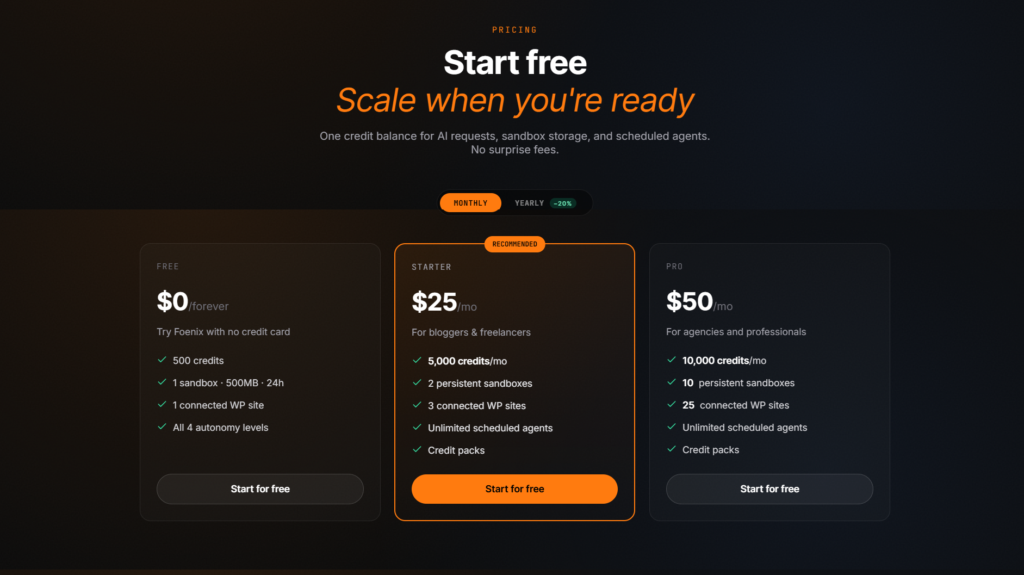
Foenix.ai uses a credit-based pricing system, so the monthly price alone does not tell you how much work you can actually perform. While the pricing sounds simple: $25 gets you 5,000 credits on the Starter plan the truth is credits are not a fixed unit of work. Credit consumption varies according to task complexity, AI model, research requirements, image generation, and other factors.
So, the real question isn't “how many credits do I have.” It's “how much work can $25 actually get me?”
Foenix's published benchmarks provide a useful starting point:
| Task | Approximate credits |
| Build a page or site | ~200 |
| Internal-link audit and fix | ~100 |
| Autopilot SEO article | ~200 |
But you must understand that these are working estimates, and not fixed prices for every task. A complex review page requiring SERP research, images, custom HTML, CSS, and retries can consume substantially more credits than a simple formatting task.
Foenix also provides different AI model modes. Lite Mode is more credit-efficient and suits straightforward tasks, while Plus and Ultra modes use stronger reasoning models for work where formatting, structure, and implementation accuracy matter more, but they consume more credits.
How to Reduce Credit Waste
- Use Lite Mode for simple chores. Apply it to basic formatting corrections, short product excerpts, and other low-complexity work.
- Reserve Plus Mode for demanding affiliate content. Use stronger models for comparison tables, CSS, detailed reviews, and complex page structures where mistakes can trigger costly retries.
- Measure your actual credit burn. Use the free 500-credit allocation to test your specific workflows before committing to the $25 Starter plan.
This is the practical way to evaluate Foenix AI credits. Do not estimate value from the headline credit allowance alone. Test your actual WordPress tasks, record consumption, and then calculate whether the resulting time savings justify the monthly cost.
For example, when I used the Lite Mode for the comparison post I mentioned above, the credit consumption was 109 when I was on the trial package however, when I tried the same prompt with the pro package, the consumption was 34. Though I can't confirm this at the moment, but I'm thinking the credit consumption for the free trial and the paid packages are not the same.
Find Out What 500 Credits Can Do for Your Workflow
Foenix.ai's credit system makes real-world usage more important than the headline subscription price. Use the free allocation to test your actual WordPress tasks and measure how many credits your workflow consumes.
Is Foenix.ai Safe to Connect to a Live WordPress Site?
I wouldn’t answer this with a simple yes. Rather, I would say that you should treat Foenix.ai as a powerful WordPress automation tool that requires controlled deployment, backups, and human oversight. Because the Foenix Worker connects through the WordPress REST API and enables server-side PHP operations, the agent has access to a powerful part of your website environment. That makes its built-in safeguards important, but it does not make autonomous changes risk-free.
The Foenix Worker plugin uses HTTPS, encrypts keys, and does not modify WordPress core files. It's open-source, so the code is inspectable, and it can be uninstalled instantly with zero vendor lock-in. None of that guarantees a flawless outcome, but it does mean you're not stuck if you want out.
There is another factor to consider when it comes to safety: developmental maturity. Foenix.ai is an early-stage product, so it does not yet have a long independent operating history across thousands of different WordPress configurations. That makes controlled testing particularly important for sites that generate meaningful affiliate revenue.
AI-generated content also requires editorial review. Google recommends creating helpful, reliable content for people, which means an autonomous WordPress agent should not become a substitute for factchecking, original expertise, or quality control.
A Practical Foenix.ai Security Protocol
- Take a complete backup. Before connecting Foenix or another automation tool, create a local backup using a WordPress backup solution such as UpdraftPlus or your hosting control panel.
- Use draft status. Configure automated content tasks to save posts as DRAFT, not publish them automatically.
- Monitor the work log. Review what the Coder and Verifier agents actually executed during background tasks.
- Test on staging first. Run significant SEO, code, plugin, and content changes in a sandbox before touching your production site.
The safest approach is controlled autonomy. Let Foenix handle repetitive operations while you retain authority over changes that affect rankings, revenue, compliance, and customer-facing content.
Test It Before You Trust It
Foenix.ai can perform powerful WordPress operations, so your first test should happen in a controlled environment. Create a free sandbox, run low-risk tasks, and review the results before giving the agent access to important production workflows.
Conclusion: Is Foenix.ai Worth Testing for Affiliate Marketers?
Foenix.ai is worth testing if your main problem is the amount of repetitive WordPress work required to operate an affiliate site or content portfolio. Foenix.ai does not give AI another writing box. It gives AI the ability to operate the website. From the four-agent safety system to the four autonomy levels, sandbox cloning, and dynamic credit costs, every piece of the product points toward the same idea: WordPress work, without the WordPress work.
That being said, Foenix.ai is most useful for affiliate marketers who already have a content system in place. It is not a replacement for affiliate strategy. You still need good keyword mapping, strong SERP analysis, real product knowledge, conversion-focused page structure, compliance checks, and quality control. No agent, no matter how capable, replaces that judgment.
So, if you manage a WordPress affiliate portfolio and you're tired of manual maintenance eating your publishing time, create a free Foenix.ai account and start with the free sandbox. Test the workflows that consume your time and let your own results determine whether the $25 Starter plan is worth adding to your WordPress toolkit.
Ready to Put Foenix.ai to the Test?
You don't need to commit to the paid plan to find out whether Foenix.ai can save you time. Start with the free 500-credit sandbox, test a few low-risk WordPress tasks, and see how the AI agent fits your workflow.
Frequently Asked Questions
What is Foenix.ai and what does it do?
Foenix.ai is an autonomous AI agent for self-hosted WordPress websites. It can analyze site content, build pages, modify website elements, perform SEO tasks, fix internal links, generate content, and run scheduled maintenance tasks. Unlike a standard AI content writer, Foenix.ai can operate within the WordPress environment and work with themes, plugins, content, and database context.
Is Foenix.ai legit and safe for a live WordPress site?
Foenix.ai is an active WordPress AI platform developed by Cybereter, and its Foenix Worker plugin uses HTTPS, encrypts keys, and does not modify WordPress core files. However, users should not treat its safeguards as a guarantee against every possible error because autonomous WordPress changes can still create problems. Use backups, staging or sandbox testing, draft status, and human review before applying significant changes to a live site.
Does Foenix.ai work with WordPress.com or only self-hosted WordPress?
Foenix.ai is built for self-hosted WordPress installations where users can install and connect the Foenix Worker plugin. The platform works with the WordPress environment, including themes, plugins, content, database context, and REST API operations. The available source material does not establish support for standard WordPress.com hosting, so this review should not claim that Foenix.ai works with WordPress.com plans.
Is Foenix.ai free, and what do the paid plans offer?
Foenix.ai has a free plan with 500 credits, one connected WordPress site, and one 500 MB sandbox that lasts 24 hours. The Starter plan costs $25 per month and provides 5,000 monthly credits, three connected sites, and two persistent sandboxes, while the Pro plan costs $50 per month and provides 10,000 credits, 25 connected sites, and 10 persistent sandboxes.
Is Foenix.ai good for affiliate marketers and SEO sites?
Foenix.ai is well suited to affiliate marketers who already have a content system and need to reduce repetitive WordPress maintenance. It can automate tasks such as internal-link audits, SEO checks, content updates, page creation, and scheduled site maintenance. However, affiliate marketers still need to control keyword strategy, product research, factual accuracy, affiliate disclosures, conversion strategy, and final editorial quality.
Should I test Foenix.ai before connecting my real WordPress site?
Yes, testing Foenix.ai in its sandbox is the safest starting point for an affiliate or SEO site. The free plan provides a ready-to-use WordPress sandbox with 500 MB of storage for 24 hours, allowing you to test prompts and observe how the AI agent handles WordPress tasks before connecting a production website. For larger or higher-risk changes, use a persistent staging environment and maintain a current backup.