Chadrack
I've spent years managing WordPress sites the traditional way – logging into wp-admin, opening posts one by one, checking SEO, fixing links, updating old content, and deciding which articles still deserve attention.
I've spent years managing WordPress the traditional way: logging into wp-admin, opening posts one by one, checking SEO, fixing dead links, and trying to remember which articles actually needed attention. It's tedious work that I’ve never enjoyed doing.
Web Income Journal has been running since 2011, with more than 500 published articles. Over the past two years, I shifted the site's focus from general digital marketing to AI affiliate marketing. That shift left hundreds of older articles that no longer fit the site's direction.
I've spent the last few months manually deleting, updating, or redirecting more than a hundred of these old posts. It worked. It was also exhausting. So, when I came across Foenix.ai, an autonomous AI agent that connects directly to a WordPress site, one question stuck with me: could it safely take this boring, necessary work off my plate?
To find out, I connected Foenix.ai to my real WordPress installation. I asked it to analyze posts older than three years, identify what was outdated, and surface older articles still pulling in Google impressions. I wasn't just testing execution. I wanted to know if it could spot genuine opportunity on its own.
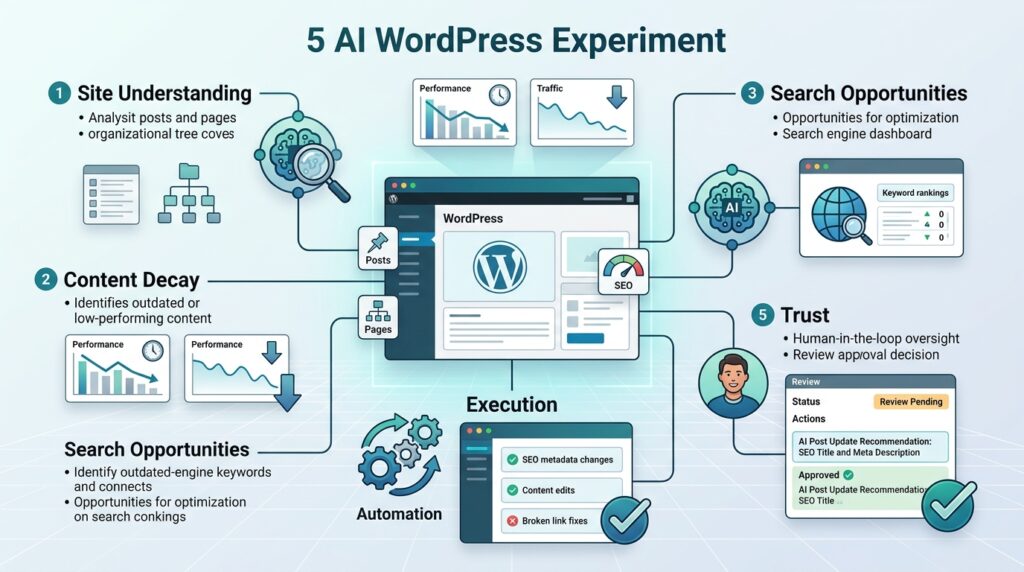
That test came down to five questions: Can it understand the site? Can it identify worthwhile work? Can it execute correctly? Can I trust the results? And does it actually save time?
In this post, I’m sharing the experiments and my findings with you.
Key Takeaways
- An AI WordPress agent can analyze, update, and manage real WordPress content rather than simply generate text.
- Foenix.ai identified genuine outdated content and SEO opportunities across my existing article portfolio.
- AI automation does not eliminate human judgment. I still needed to decide what should be updated, consolidated, redirected, or deleted.
- The biggest value is operational. Foenix.ai can reduce repetitive WordPress maintenance and content-audit work.
- My experiment showed that AI can run parts of a WordPress operation, but not the entire business on autopilot.
Try Foenix.ai in its sandbox first, then decide whether its AI-powered WordPress automation fits your workflow. Use code WIJCODE30 for 30% free.
Try Foenix.ai Free →
What I Wanted Foenix to Prove
I did not want to test Foenix.ai with an easy prompt such as “write me a blog post.” An AI writer can already do that. I wanted to know whether, as an AI WordPress agent, Foenix could understand an established site, identify worthwhile work, execute that work, and give me results I could trust.
So, I structured the experiment around five tests.
Test 1 – Could Foenix understand my site?
First, I wanted to know whether Foenix could understand the environment it was working in. That meant looking beyond individual articles and considering the site's broader structure.
I wanted it to recognize:
- Existing posts and pages
- Categories and content relationships
- Active plugins and themes
- Existing SEO settings
- Relationships between related articles
- The overall content structure of the site
That distinction matters. A useful WordPress management agent needs site context, not just the ability to generate text.
Test 2 – Could it detect genuine content decay?
The second test was more difficult. Could Foenix identify articles that were genuinely outdated rather than simply old?
Three years old does not automatically mean outdated.
Google's guidance on creating helpful, reliable, people-first content specifically warns against changing content simply to make a site appear fresh. The objective is to provide meaningful value to readers, not manufacture freshness for search engines.
That gave me an important test of judgment. I wanted Foenix to tell me whether an article still deserved investment, not simply flag everything beyond a certain age.
Test 3 – Could it find hidden search opportunities?
Next, I wanted Foenix to combine content age with actual search performance.
Could an AI SEO agent for WordPress identify older articles that were still receiving Google impressions but were failing to reach their potential?
That is a much more useful question than simply asking which old articles still rank.
Test 4 – Could it execute the work correctly?
Recommendations are useful, but execution is where an autonomous WordPress agent becomes interesting.
I wanted to see whether Foenix could update selected articles without damaging formatting, links, SEO elements, or other site components.
Test 5 – Could I trust it enough to use again?
Finally, I asked myself the question that matters most to a site owner:
Would I actually let Foenix do similar work again?
A tool can be technically impressive and still fail this test. For me, trust depends on accuracy, control, verification, and the amount of human cleanup required after the agent finishes.
Start with the Foenix.ai sandbox and see how it handles your own WordPress environment before committing to a paid plan.
Test Foenix.ai Free →
Why I Chose Older Content for the Experiment
I chose older content because established websites develop a serious content maintenance problem. Web Income Journal has been operating since 2011, so after 15 years of publishing, I have accumulated plenty of articles that need attention. The problem is not simply the number of articles. It is knowing which ones deserve that attention.
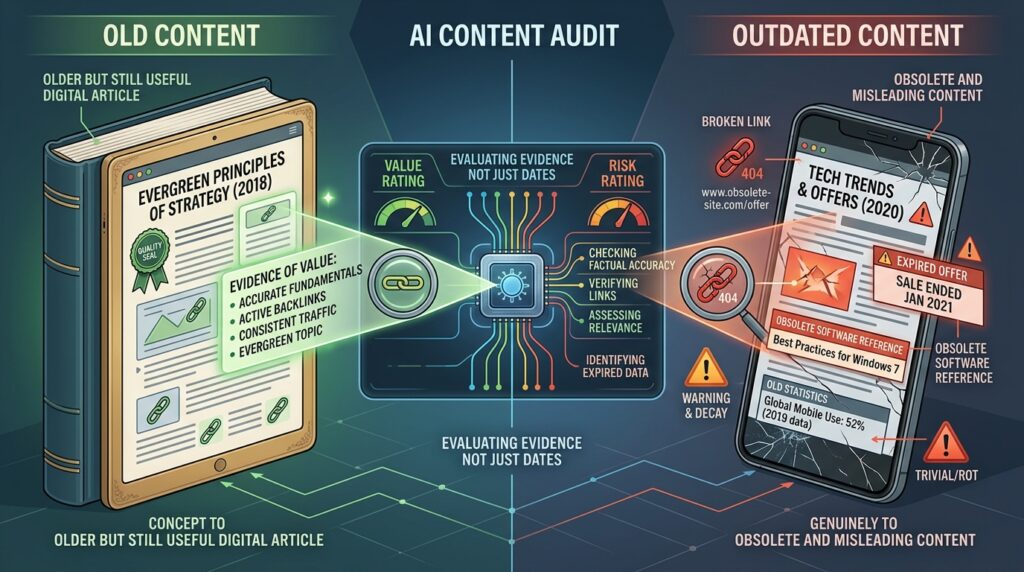
Content decay can take many forms. An article may contain outdated screenshots, obsolete product information, broken links, old recommendations, outdated statistics, weak internal linking, missing sections, or SEO elements that no longer make sense.
Search intent can also change.
An article may have been created for a search query that means something different today. A page can also continue receiving Google impressions while failing to capture its available traffic because the content, title, structure, or search intent alignment has fallen behind.
That creates what I think of as the content maintenance cost of an established website. Every additional article creates another asset that eventually needs to be reviewed, updated, redirected, consolidated, or retired.
But I did not want Foenix to make a simple assumption:
Old content = bad content.
That would make the experiment almost useless.
The real objective was to determine whether an older page still deserved investment. That means looking at factual accuracy, usefulness, search intent, internal links, SEO elements, competing content, and actual search performance rather than the publication date alone. Google's people-first content guidance supports this approach by emphasizing useful, reliable content and meaningful improvements rather than changes made simply because content is old.
I deliberately limited the risk
I also did not give Foenix unrestricted autonomy and walk away.
I backed up the site and used a staging clone with bounded prompts before running the test. That precaution was deliberate because Foenix's own documentation states that its agent can have administrator-level access capable of modifying files, databases, plugins, and themes, and recommends using a backup or sandbox before running agents on a real WordPress site.
You can review Foenix's documented approach to how its system works and its backup and safety guidance for the technical details.
For this experiment, safety came before automation.
I wanted to find out what an AI WordPress agent could accomplish without gambling with the site's rankings, revenue, or existing content.
Experiment #1 – I Asked Foenix to Audit My Posts Older Than Three Years

I started with the most obvious WordPress maintenance problem on my site: old content. But I did not want Foenix.ai to simply produce a list of everything published more than three years ago. I wanted to know whether Foenix.ai could actually distinguish content that was old from content that was no longer useful.
The prompt I gave Foenix.ai
I built the audit prompt with ChatGPT and instructed Foenix to evaluate each qualifying article against several practical content and SEO criteria.
Here’s the exact prompt:
Act as an expert SEO strategist and AI affiliate marketing specialist.
Context: The Web Income Journal WordPress site is focused primarily on AI affiliate marketing, including AI tools, affiliate marketing strategies, blogging, SEO, content marketing, WordPress, and using AI to build and grow profitable websites.
I want you to perform a site-wide content audit of every blog published between 2022 and 2023.
For this task, do not make any changes to my website. This is an analysis-only task. Do not edit, delete, redirect, consolidate, unpublish, or rewrite any content. I want your recommendations first so I can review them before authorizing any changes. Respond only in English.
Step 1: Identify the posts to audit. Find every published blog post on my site with a publication date more than 3 years ago. For each post, analyze the current content rather than judging it solely by its age. An old article is not automatically outdated.
Step 2: Evaluate each article on accuracy, whether recommendations are outdated, broken or obsolete links, whether search intent has changed, missing topics, ongoing usefulness, and a final call: UPDATE, CONSOLIDATE, REDIRECT, LEAVE ALONE, or REVIEW.
Step 3: Evaluate strategic value for affiliate recommendations, AI tool comparisons, internal linking, and topical authority, without recommending affiliate links for their own sake.
Step 4: Look for content decay, not simply old content. An evergreen article that still satisfies its search intent gets LEAVE ALONE. I want content decay identified, not manufactured.
Step 5: Produce a prioritized audit table with Post, Publication Date, Age, Current Status, Key Problems, Missing Topics, Search Intent Assessment, Recommended Action, Priority, and Reason.
Step 6: Create four action lists — Update First, Consolidate, Redirect or Remove From Priority, and Leave Alone.
Important instructions: do not change anything on my WordPress site, do not rewrite articles, do not create redirects, do not delete or unpublish anything. This is strictly a research and diagnostic audit.
The prompt was deliberately broad because I wanted Foenix to assess the article rather than make a decision based on age alone.
What I expected Foenix to find
For every article, I wanted the audit to answer seven basic questions:
- Is the information still accurate?
- Are the recommendations outdated?
- Are links broken or obsolete?
- Has the search intent changed?
- Are important topics or sections missing?
- Is the article still useful to readers?
- Should I update, consolidate, redirect, or leave it alone?
That last point was particularly important.
I did not want a machine-generated “update everything” list. I wanted an AI content audit that could identify different actions for different articles.
What Foenix.ai actually found
The first two attempts produced an interesting result before the audit even got underway.
Foenix.ai identified 161 posts older than three years, which matched the age criterion in my prompt. However, the analysis service failed on both attempts, so Foenix could not complete the audit. Those two failed runs consumed 154 credits in total – 122 credits on the first attempt and 32 on the second.
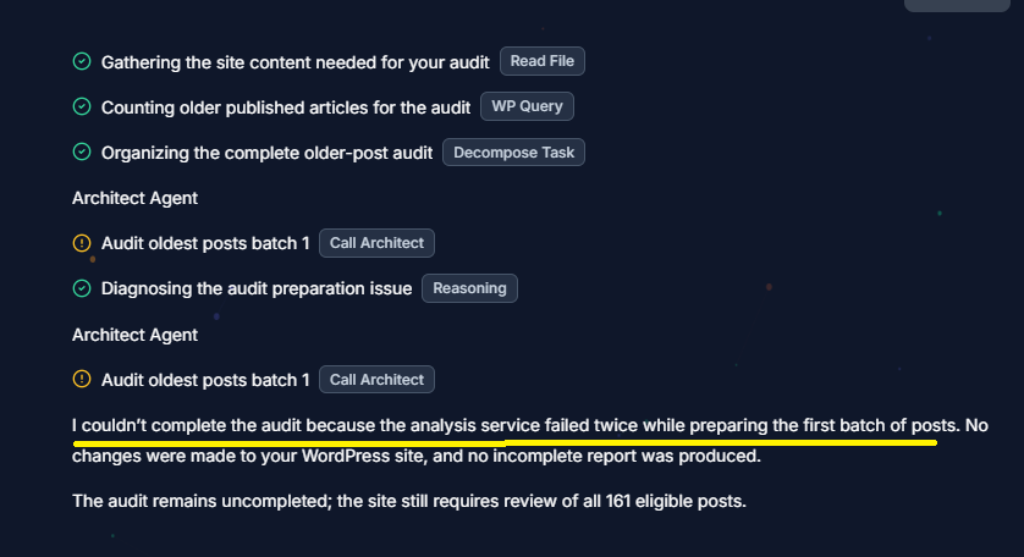
Rather than keep throwing credits at the same problem, I changed the scope.
I limited the test to a single publication year and asked Foenix to analyze posts published during 2023. That worked. Foenix successfully identified and audited 52 long-form posts from that year.
The resulting audit was organized into four documents, which made the large report surprisingly manageable. The first three documents divided the 52 articles into chronological batches: 17 posts published from January 2 through April 27, 18 from May 8 through September 6, and 17 from September 11 through December 22. The fourth document provided the final synthesis across all 52 posts.
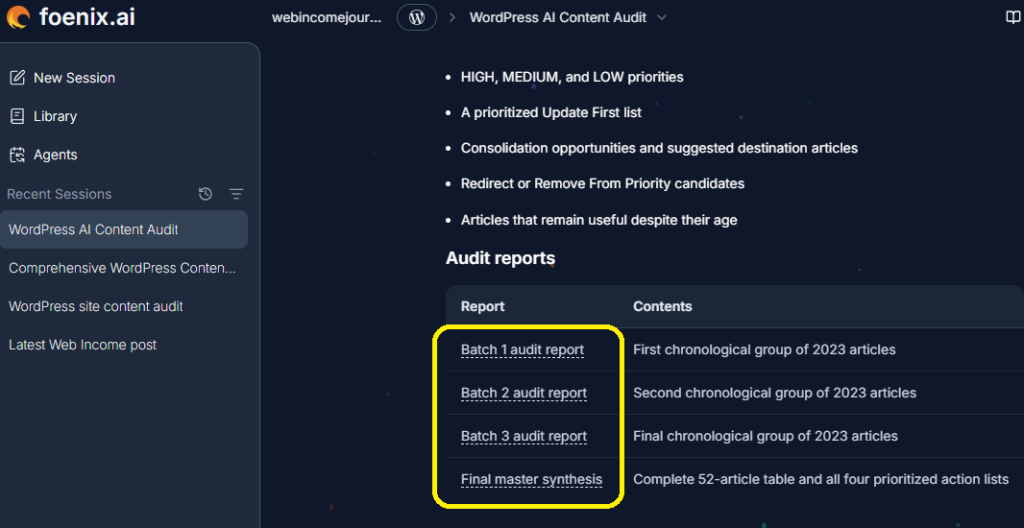
The findings were far more useful than a simple age-based content list. Here are seven representative findings from the full report:
| Article | Age | Foenix's assessment | Recommended action | My decision |
| How to Build High Authority Backlinks… with HARO (ID 39420) | 3.4 years | Severe factual decay. The article depended on HARO as an active link-building workflow, although the platform and successor Connectively had permanently shut down on December 9, 2024. | Update: Add a status warning, replace the defunct workflow with current earned-media alternatives such as Featured, and replace third-party Domain Authority metrics with Google's indexation signals. | Update |
| Google SGE and the Future of SEO (ID 41731) | 3.0 years | Stale technology concepts. The article treated Search Generative Experience as an upcoming experiment rather than reflecting the current Google AI Overviews environment. | Update: Reframe around Google AI Overviews and current generative search, with emphasis on crawlability, indexability, E-E-A-T, and authorship. | Update |
| Best WordPress Black Friday Deals for 2023 (ID 42551) | 2.7 years | Expired promotional content. The page contained expired dates, coupon codes, and prices. | Redirect: Send it to a relevant current seasonal deals hub if one exists; otherwise remove it with a 410 status. | Redirect/Remove |
| Boosting SEO with Google Core Web Vitals in 2024 (ID 42608) | 2.7 years | Outdated technical metrics. The article still presented First Input Delay (FID) as an active metric instead of its replacement, Interaction to Next Paint (INP). | Update: Replace FID with INP, explain CrUX field data, and separate user-experience benefits from ranking claims. | Update |
| Best Practices for Optimizing Keywords for SEO in 2024 (ID 40207) | 3.3 years | Keyword cannibalization and legacy SEO. The article used stale 2024 framing and promoted mechanical 1–2% keyword-density rules and rigid H-tag placement. | Consolidate: Merge durable concepts into Article 41301 and replace obsolete keyword-density advice with entity-based topical mapping. | Update rather than consolidate |
| The Ultimate Guide to Choosing the Best WordPress SEO Plugin (ID 39511) | 3.3 years | Commercial overlap. The article competed with existing Yoast and All in One SEO reviews for similar plugin queries. | Consolidate: Combine the competing articles into a definitive WordPress SEO Plugin Showdown. | Update rather than consolidate |
| 12 Best Web Hosting Affiliate Programs Guaranteed to Boost Your Income (ID 38587) | 3.5 years | FTC compliance and unsafe claims. The title used an absolute income guarantee, while commission rates and hosting prices had also become outdated. | Update: Remove guaranteed-income language, add prominent affiliate disclosures, and verify current pricing and commission information. | Update |
The results confirmed something I wanted to know before starting this experiment: an AI content audit can uncover problems that are easy to miss when you are reviewing hundreds of articles manually.
More importantly, Foenix did not find one single type of problem. It identified factual decay, obsolete technology, expired promotions, outdated SEO practices, content overlap, commercial cannibalization, and compliance concerns.
That gave me something much more valuable than a list of old posts.
It gave me a prioritized content-maintenance roadmap.
The most useful part of an experiment like this is not where the tool succeeds. It is seeing where its recommendations still need to be challenged by someone who understands the site, its audience, and its business model.
I used Foenix.ai to analyze 52 older Web Income Journal articles and uncover problems I would have had to find manually. If your WordPress site has years of accumulated content, you can use Foenix.ai to see what an AI agent finds on yours.
Try Foenix.ai Free →
What Foenix Got Right – and Where It Got It Wrong

The Foenix.ai audit was impressive, but it was not infallible. That distinction matters if you are considering an AI WordPress agent for serious content management. I found genuine problems I had overlooked, but I also found recommendations that I would not follow.
What impressed me
The biggest thing that impressed me was Foenix's ability to read every article published during the audit period and assess the content at scale.
That is a significant operational advantage.
Instead of manually opening dozens of posts, checking their dates, reviewing their information, and trying to remember whether a recommendation was still relevant, Foenix analyzed the articles as a group. It identified several critical and urgent factual risks across my content portfolio.
The problems were also specific.
Foenix identified obsolete platforms, outdated software and technical information, expired commercial offers, and non-compliant or unsupported commercial claims. The HARO article is a good example. It recognized that an article built around a platform that had permanently shut down could no longer be treated as current advice.
That is exactly the kind of content decay detection I wanted from the experiment.
What surprised me
I was also surprised by how Foenix organized the results.
The audit was large and extensive, but Foenix divided the 52 articles into three chronological batches and then produced a fourth document containing the overall synthesis. That structure made the report considerably easier to work through.
The final synthesis was particularly useful because I did not have to extract the main patterns from dozens of individual recommendations myself.
For a busy blogger or affiliate marketer, this matters.
An AI content audit is much more useful when it produces an actionable roadmap rather than simply dumping findings into a long report.
Where I disagreed with Foenix
This is where the experiment stopped being a simple product demonstration. And this matters if you are deciding whether to trust this tool with real decisions.
Foenix identified several areas of strategic content overlap where articles targeted closely related queries, duplicated tool lists, or served similar audiences. Its solution was to consolidate some of these articles into designated canonical hubs.
I agree with that recommendation in some cases.
However, I disagreed with its recommendation to combine my WordPress SEO plugin comparison articles with my Rank Math tutorials and workflows into one definitive SEO-plugin showdown.
I have six Rank Math articles and three WordPress SEO plugin articles involved in this area. My preference is to update each article and give each one a clearly defined purpose rather than turn them into one enormous piece of content.
That decision requires knowledge that an automated content audit does not fully possess.
These articles have different histories, different search opportunities, different commercial purposes, and different relationships to the rest of my site. Consolidation may solve one SEO problem while creating another.
What required human judgment
This became one of the clearest lessons from the experiment: an AI recommendation is an input to a content decision, not automatically the decision itself.
The right action depends on the individual website.
A page that Foenix recommends consolidating may have enough search visibility, affiliate value, topical relevance, or strategic importance to justify updating it instead. Conversely, an article that looks worth saving from a purely content perspective may no longer fit the direction of the business.
Interestingly, the second experiment reinforced this point.
Several articles Foenix initially flagged for consolidation later appeared in its search-opportunity analysis as pages worth updating to improve their potential. That does not mean the first recommendation was necessarily wrong. It demonstrates that content decisions change when additional evidence enters the analysis.
This is why I would not hand an AI WordPress agent the final say over my content portfolio.
Foenix can process the evidence much faster than I can. It can identify patterns I might miss. But I still decide which articles fit the business, which pages deserve investment, and which recommendations make sense for Web Income Journal.
My experiment showed where Foenix performed well and where I still wanted human control. If you manage a WordPress site and want to test the same workflow yourself, you can start with Foenix.ai.
Explore Foenix.ai →
Experiment #2 – Can AI Find SEO Opportunities Hiding in Old Content?

The second experiment asked a more interesting question than “Which old posts rank?” I asked Foenix.ai to identify strategic SEO opportunities by analyzing older Web Income Journal posts alongside Google Search Console performance data.
The key question was: Which older articles are already getting Google's attention but are not reaching their full potential?
That distinction matters because an article receiving impressions has already demonstrated some level of search visibility. Instead of automatically treating its age as a reason to update it, I wanted Foenix to consider age + impressions + queries + average position + content quality.
Google Search Console provides performance data including impressions, clicks, click-through rate, and average position, with performance available at the page and query level. That gave Foenix another layer of evidence to work with.
The result was less like an old-content audit and more like a content refresh roadmap. It allowed me to identify articles where improving relevance, accuracy, commercial information, or search intent could potentially recover existing traffic and strengthen affiliate opportunities.
For this experiment, I gave Foenix the Search Console data for the last 90 days and asked it to look for older pages with measurable search visibility and identify ways to strengthen them.
Here's the exact prompt I used for this test:
Act as an expert SEO strategist and AI affiliate marketing specialist.
Context: My website focuses primarily on AI affiliate marketing, including AI tools, affiliate marketing strategies, blogging, SEO, content marketing, WordPress, and using AI to build and grow profitable websites.
I want you to perform a search-opportunity audit of my older WordPress articles. The goal is to identify older articles that are still receiving Google search impressions but may have significant opportunities for improvement.
Do not make any changes to my website. This is an analysis-only task.
Step 1: Find published posts more than 2 years old, prioritizing those with meaningful Google search impressions. High impressions alone don't mean an article needs updating.
Step 2: Analyze impressions, clicks, CTR, average position, and search queries for each eligible article, paying particular attention to pages ranking positions 4–30, receiving impressions for multiple related queries, or ranking for topics the article doesn't adequately cover.
Step 3: For every promising article, identify what's already working and where the gap is: missing information, weak topical coverage, search-intent mismatch, weak internal linking, or missing current statistics.
Step 4: Give special attention to “striking distance” opportunities in positions 4–30, and explain the query, current position, impressions, and what specific improvement could strengthen the page.
Step 6: Evaluate affiliate opportunities carefully, but only recommend them when a product recommendation would genuinely help the reader.
Step 7: Score each opportunity 1–10 based on search visibility, query relevance, striking-distance potential, and business value, without inflating scores.
Step 10: Separate observed data, analysis, and recommendation. Do not present assumptions as facts.
Important instructions: do not edit my website, do not rewrite any article, do not add affiliate links, do not make ranking guarantees. Most importantly, do not equate “old plus impressions” with “needs updating.”
What Foenix found
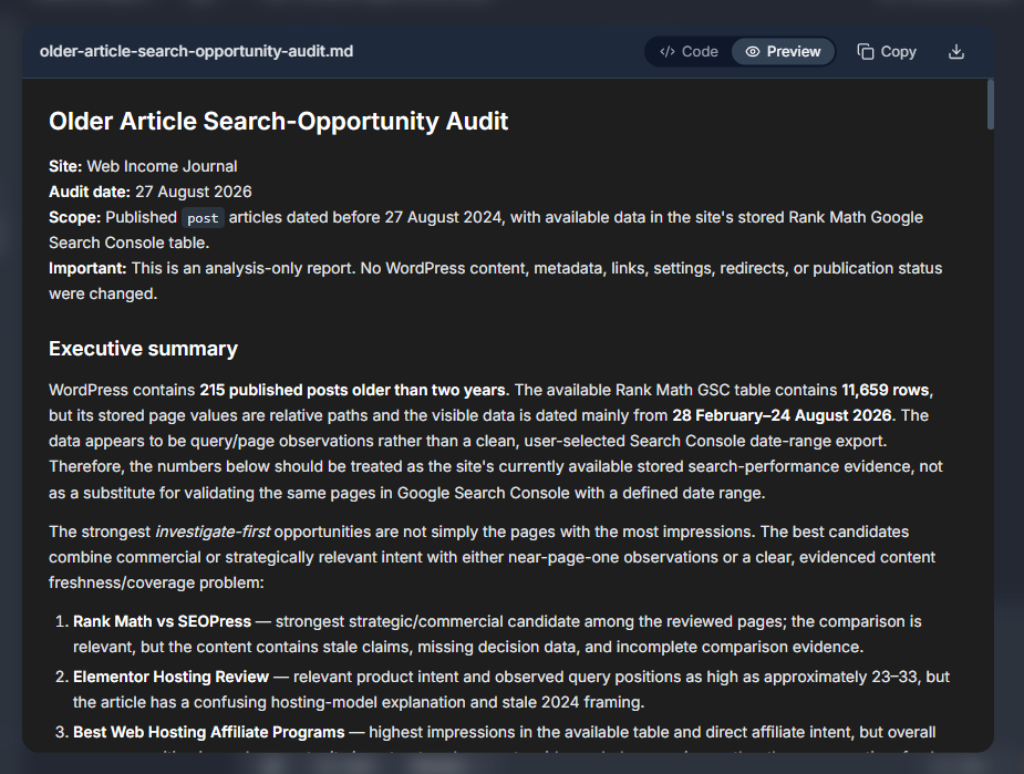
The results were particularly interesting because Foenix did not simply prioritize articles with the highest impression counts. It looked at the relationship between visibility, average position, relevance, content quality, and commercial intent.
Several of the strongest opportunities were software comparisons and web hosting articles. These pages already had commercial intent, but Foenix identified outdated information and trust gaps that could weaken their ability to convert existing search visibility into clicks and revenue.
For example, it recommended rebuilding the Rank Math vs SEOPress comparison around current features and pricing, while adding a compact decision matrix. For hosting content, it identified the need to verify affiliate terms, clarify product models, and update information that could influence a buyer's decision.
Here’s a table showing some of the posts surfaced in the opportunity report:
| Article | Age | Impressions | Avg. position | Opportunity Foenix identified | My verdict |
| Rank Math vs SEOPress: Which Plugin Gives You More Bang for Your Buck? | 2y 1m | 914 | 47.1 | Rebuild the comparison around current features and pricing, relevant Schema changes, and agency price-locks. Add a compact decision matrix. | Strong – 8/10 |
| Elementor Hosting Review: Is It the BEST for Beginners in 2024? | 2y 0m | 473 | 61.7 | Clarify first-party Elementor Hosting versus self-hosted WordPress. Update the temporal framing, remove the duplicated introduction, and explain NVMe storage limits. | Strong – 8/10 |
| 12 Best Web Hosting Affiliate Programs Guaranteed to Boost Your Income (2025) | 3y 6m | 2,070 | 83.3 | Verify commission rates and 180-day cookies, check WP Engine's move to Everflow, and create a stricter audience-fit matrix. | Strong – 7/10 |
| Best WordPress Hosting Services for Beginners in 2024 | 2y 2m | 1,358 | 77.1 | Verify Trustpilot ratings, explain the “Renewal Price Trap,” and outline relevant hardware limitations. | Strong – 7/10 |
| 29 Best Affiliate Marketing Tools for Bloggers | 3y 4m | 535 | 80.2 | Reorganize the 29-tool list around user Jobs-to-be-Done, such as SEO, email, design, and link management, while removing outdated platforms. | Moderate – 6/10 |
| The Ultimate Guide to Choosing the Best WordPress SEO Plugin | 3y 4m | 423 | 83.7 | Replace the heavily one-sided Rank Math recommendation with a neutral requirements matrix covering WooCommerce, Schema, and local SEO considerations. | Moderate – 6/10 |
One recommendation particularly caught my attention. The 12 Best Web Hosting Affiliate Programs article had generated 2,070 impressions, yet its average position was 83.3. That combination suggested there was visibility to work with, but also a substantial ranking gap.
Foenix therefore did not tell me simply to “update the article.” It identified specific commercial and trust elements that needed verification before the page could become more useful.
That is the difference between age-based content maintenance and opportunity-based content optimization.
The report also cautioned against assuming that every page with impressions deserves an update. A page can have search visibility without being genuinely relevant to the site's current direction or audience.
For me, that was one of the most valuable findings from the entire experiment.
The objective is not to refresh every old article. It is to find the pages where existing search visibility, content quality, search intent, and business value intersect.
That gives a site owner a much more selective strategy: invest effort where the evidence suggests there is something worth recovering or growing, rather than spending weeks updating content simply because it has an old publication date.
Your old articles may already be getting Google's attention. Foenix.ai can help you identify which pages deserve another look instead of making you manually review your entire content library.
Analyze Your WordPress Site with Foenix.ai →
How Much Time Did Foenix Actually Save Me?
This is one area where I need to be careful about the numbers. I did not track the hours I spent manually reviewing and updating old articles before using Foenix.ai, so I cannot honestly give you an exact percentage of time saved.
What I can say is that the traditional process took days in total. On some days, I spent several hours opening articles, checking whether the information was still relevant, and deciding whether to update or delete them. On other occasions, I made decisions more subjectively, including deleting articles based on whether their topics still fit the direction of Web Income Journal.
The Foenix experiment gave me something much easier to measure.
The first two attempts to audit all 161 qualifying posts took approximately 1 hour and 47 minutes combined, but neither audit completed because the analysis service failed. When I narrowed the scope to posts published in 2023, Foenix completed the audit of 52 articles in approximately 45 minutes.
The second experiment, which analyzed older articles against Search Console performance data, took approximately 25 minutes.
| Task | Traditional workflow | Foenix workflow | Measurable result |
| Identify outdated posts | Days across the existing backlog | ~45 minutes for 52 posts | Dramatically less manual review |
| Find search opportunities | Manual Search Console and content analysis | ~25 minutes | Rapid opportunity identification |
So, I cannot claim that Foenix saved me a precisely calculated X% of my time. I did not collect the baseline data required to make that calculation.
But the difference in workflow was obvious.
Instead of spending hours deciding where to start, I received a structured analysis that told me which problems existed and why they mattered.
For me, that is the real time-saving benefit. Foenix did not eliminate the work. It moved much of the repetitive discovery and analysis out of my hands so I could spend my time making the decisions that actually require human judgment.
If you want to test whether Foenix.ai can save you time managing your WordPress site, you can use my exclusive coupon code:
WIJCODE30
Use the code when you sign up to claim 30% free.
Get Foenix.ai With My Coupon →
What I Would – and Wouldn't – Trust Foenix to Do
After running both experiments, I would trust Foenix.ai with a significant amount of the repetitive operational work involved in maintaining a WordPress site. But I would not interpret “agentic” as meaning “give the AI complete control and walk away.”
That distinction became clearer as I worked through the audit results.
What I would trust Foenix to do
I would be comfortable using Foenix for tasks where the objective is relatively clear and the consequences of an incorrect recommendation can be reviewed before any important changes.
That includes:
- Content audits – finding old, outdated, or potentially problematic articles.
- Internal-link analysis – identifying linking opportunities and weaknesses across existing content.
- Repetitive maintenance – handling routine WordPress tasks that would otherwise consume manual hours.
- Finding obvious outdated elements – such as obsolete information, expired references, or clearly dated material.
- Draft improvements – helping strengthen existing content before I publish the changes.
- Routine checks – monitoring areas of the site that benefit from regular review.
These are precisely the kinds of jobs where an AI WordPress agent has an advantage. The agent can process a large amount of information consistently while I review the recommendations and decide what actually matters.
What I would keep under human approval
There are other decisions where I would want to remain firmly in control.
I would personally approve:
- Deleting content
- Creating redirects
- Making major URL changes
- Making major design changes
- Changing affiliate claims or commercial statements
- Publishing factual claims that require verification
- Major strategic content decisions
- Changes to high-value money pages
The reason is simple: these actions can have consequences that extend beyond the individual WordPress article.
Deleting a page can affect internal links and search visibility. A redirect can change how users and search engines reach a resource. Changing an affiliate claim can create compliance problems. Altering a high-value commercial page can affect revenue.
Those are not decisions I would delegate simply because an AI agent can technically execute them.
Agentic does not mean unsupervised
This is probably my most important takeaway from the experiment.
Agentic AI is not the same thing as unsupervised AI.
Foenix can do more than a conventional chatbot because it can work within the WordPress environment and perform operational tasks. That makes it considerably more useful for website maintenance, but it also makes human oversight more important, not less.
My preferred workflow is therefore AI investigates → AI recommends → human verifies → AI executes bounded tasks → human reviews the result.
That approach gives me the productivity benefit without pretending that an AI system understands my business better than I do.
For a WordPress blogger or affiliate marketer, that is the level of automation I would be comfortable adopting today. Let the agent handle the repetitive work. Keep the consequential decisions with the person who owns the site.
Start with Foenix.ai and keep human approval over the decisions that matter most.
Try Foenix.ai →
Foenix.ai: What I Like and What Concerns Me
After using Foenix for these experiments, I see a clear difference between its potential and its limitations.
What I like
- Agentic rather than chatbot-based. Foenix does not stop at answering questions. It can work within the WordPress environment and perform tasks based on instructions.
- WordPress-native workflow. It can work with the site's content, themes, plugins, and database rather than requiring me to manually transfer information between an AI chatbot and WordPress. Foenix currently supports common WordPress tools including Elementor, Gutenberg, WooCommerce, Yoast SEO, Rank Math, WPForms, and others.
- Scheduled automation. The ability to schedule recurring agents is particularly interesting for maintenance tasks such as SEO checks, broken-link scans, and content reviews.
- Sandbox and multi-agent architecture. The sandbox gives users a safer environment for testing, while Foenix's architecture separates planning, execution, and verification across specialized agents.
- Low-friction entry point. The free plan includes 500 credits, a sandbox, and one connected WordPress site, so you can test the concept before paying.
What concerns me
- Product maturity. Foenix is still a relatively new product, so I would not treat it as a completely proven replacement for established WordPress workflows.
- Credit consumption needs monitoring. My own tests showed significant variation. The two failed audits consumed 154 credits combined, the successful 2023 audit consumed 895 credits, and the Search Console opportunity audit used only 46 credits. I also used the free Sandbox for a sample comparison post and recorded approximately 109 credits for that test.
- That variation means I would monitor credit usage rather than assume every task has a predictable cost.
- Autonomous changes require trust. A system that can modify a WordPress site creates a different risk profile from a chatbot that only provides suggestions.
I would also keep rollback, backups, and human review in the workflow. Foenix itself recommends using a sandbox or backup before major work, and its documentation acknowledges that no autonomous system is flawless.
For a complex WordPress installation, I would expect more edge cases. That is why my experience with a real site makes me comfortable recommending Foenix as an assistant, but not as an unsupervised replacement for the person responsible for the website.
Foenix.ai Pricing – Is It Worth Paying For?
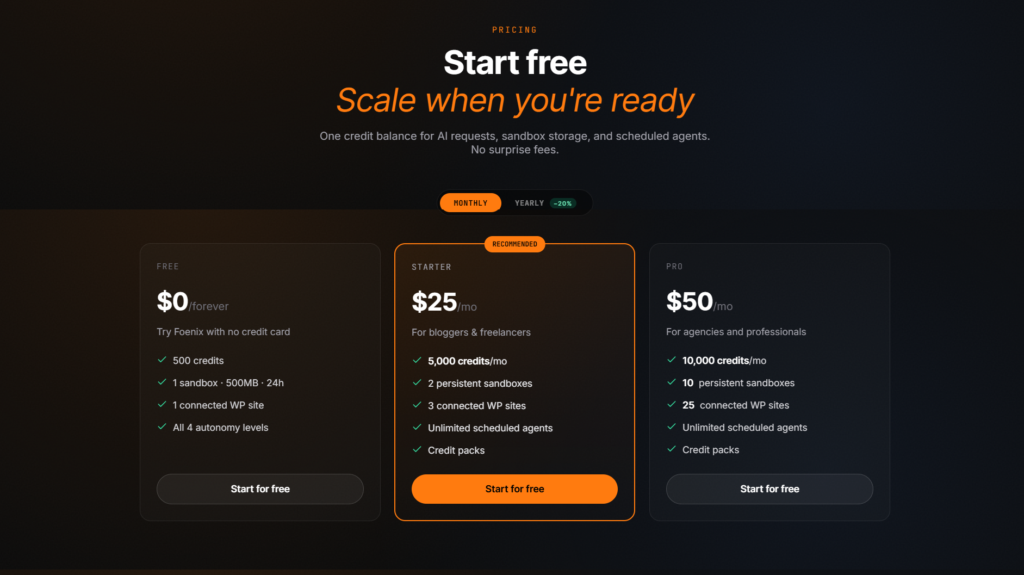
Foenix.ai currently has three main plans: Free at $0, Starter at $25/month, and Pro at $50/month. The Starter plan includes 5,000 credits per month, two persistent sandboxes, three connected WordPress sites, and unlimited scheduled agents. Pro increases those limits to 10,000 credits, 10 persistent sandboxes, and 25 connected WordPress sites.
| Plan | Monthly price | Credits | Connected WordPress sites | Best fit |
| Free | $0 | 500 | 1 | Testing Foenix |
| Starter | $25 | 5,000/month | 3 | Bloggers and freelancers |
| Pro | $50 | 10,000/month | 25 | Agencies and professionals |
Blogger: Is $25/month worthwhile?
For a blogger, the $25 Starter plan makes sense when WordPress maintenance has become a recurring workload. If you regularly audit old posts, check internal links, update content, monitor SEO, and perform other repetitive tasks, the subscription can be evaluated against the hours those jobs consume.
The important question is not whether $25 is cheap. It is whether the automation replaces enough manual work to make $25 worthwhile.
Affiliate marketer: Can it justify $25/month?
I think the case is stronger for an active affiliate marketer. My experiments showed that Foenix could analyze dozens of articles, identify outdated commercial information, and find older pages with search visibility and optimization opportunities.
If those tasks would otherwise consume several hours of manual research each month, the $25 subscription becomes easier to justify. The value also increases when better content maintenance helps protect existing search traffic and affiliate opportunities.
Agency: Does $50 Pro make sense?
The Pro plan is more compelling when you manage multiple WordPress sites. With up to 25 connected WordPress sites, 10,000 monthly credits, and 10 persistent sandboxes, the plan is designed for a much larger operational workload.
An agency can spread the cost across client maintenance, content audits, SEO checks, link analysis, and scheduled WordPress tasks. If Foenix saves meaningful staff time across several sites, the $50 monthly cost becomes an operational calculation rather than simply another software expense.
My conclusion: Foenix.ai is worth paying for when the work it automates costs you more in time than the subscription costs in money. The more WordPress maintenance you perform, the stronger that equation becomes.
If you manage a WordPress site and spend hours on content audits, SEO checks, maintenance, and repetitive website tasks, Foenix.ai is worth testing against your current workflow.
Use coupon code
WIJCODE30 when you sign up to get 30% free.Try Foenix.ai With My Discount →
Who Should Use Foenix.ai?
Foenix.ai makes the most sense for people who spend enough time inside WordPress to benefit from automation. The more repetitive WordPress maintenance and content-management work you perform, the greater the potential value of an AI WordPress agent.
Best for
- WordPress bloggers who have accumulated a large content library and need regular maintenance.
- Affiliate marketers managing product reviews, comparisons, commercial pages, and affiliate links.
- Freelancers who maintain WordPress websites for clients and need to reduce repetitive tasks.
- Agencies managing multiple WordPress installations and recurring client maintenance.
- WooCommerce site owners who have more complex WordPress operations to maintain.
- WordPress-heavy publishers with hundreds or thousands of articles requiring ongoing content management.
- People maintaining multiple sites who need a consistent way to identify and handle routine maintenance work.
The strongest use case is not someone who publishes one article occasionally. It is someone with an existing WordPress operation that has accumulated enough content and technical maintenance to become time-consuming.
Probably not ideal for
Foenix.ai is probably not the right fit for someone who barely touches WordPress. If your website is small, rarely changes, and requires little maintenance, there may simply not be enough repetitive work to automate.
It may also be uncomfortable for users who are not prepared to let an AI agent interact with their WordPress environment. Agentic automation requires a different level of trust than asking a chatbot for suggestions.
I also would not recommend approaching Foenix with the expectation of completely hands-off publishing. My experiment showed that human review remains important, particularly for consequential content and site decisions.
Finally, highly customized enterprise WordPress installations require careful testing before introducing an autonomous agent. The more unusual the site's architecture, plugins, workflows, and integrations, the more important a controlled environment becomes.
In short, Foenix.ai is most compelling when WordPress itself has become a significant operational workload.
My Verdict – Can AI Really Run a WordPress Site?

So, can AI really run a WordPress site?
My answer is yes – but not in the way I initially imagined.
I started this experiment wondering whether Foenix.ai could take over some of the boring WordPress work that had been consuming my time. After putting it through two real content and SEO experiments, I think that is actually the more accurate way to describe its value.
Foenix.ai is not replacing the WordPress owner. It can potentially replace a significant amount of the repetitive operational work surrounding WordPress.
That is an important distinction.
It can analyze large amounts of content, identify outdated information, uncover SEO opportunities, organize findings, and assist with repetitive maintenance. For me, that makes it a potentially valuable time and money saver, particularly for technical WordPress jobs that might otherwise require hiring a virtual assistant or spending hours doing the work myself.
But I would not give it unrestricted control.
My experiments showed that Foenix can identify problems and opportunities, but the final decision still depends on context. Whether an article should be updated, consolidated, redirected, or deleted can depend on the site's business strategy, search intent, affiliate value, topical authority, and future direction.
That is why my preferred model is AI-assisted WordPress management rather than fully autonomous WordPress management.
My Foenix.ai scorecard
Based only on what I actually tested in this experiment, rather than features I did not personally evaluate, this is how I would rate Foenix.ai:
| Category | My score | Why |
| Concept | 9/10 | The idea of an agent working directly with WordPress addresses a genuine operational problem. |
| Ease of use | 8/10 | The audit workflow was straightforward, although failed analysis runs added friction. |
| Automation | 9/10 | Its ability to analyze large batches of content and produce structured recommendations impressed me. |
| WordPress integration | 9/10 | Working within the WordPress environment is a major advantage over a conventional chatbot. |
| SEO/content workflows | 9/10 | The two experiments demonstrated particularly strong potential for content auditing and opportunity discovery. |
| Reliability | 7/10 | The first two audits failed, which prevents me from giving this category a higher score. |
| Value | 8/10 | The potential time savings make the cost easier to justify for active WordPress users. |
| Maturity | 7/10 | It is promising, but I would still treat it as a relatively new tool that deserves controlled testing. |
Overall: 8.5/10
That 8.5/10 is not a score for an imaginary future version of Foenix.ai. It reflects what I experienced during this experiment.
The failed audits matter. The need for human review matters. My disagreements with some recommendations matter.
But so does the fact that Foenix successfully analyzed 52 articles, identified serious content and compliance problems, found older pages with search opportunities, and turned a messy content-maintenance problem into something I could actually work through.
That is why I would use it again.
I would not hand an AI agent unrestricted control of a valuable WordPress site. But based on my experiment, I think Foenix.ai is worth testing if you want to automate repetitive WordPress, content, and SEO work.
Use my coupon code
WIJCODE30 when you sign up.Try Foenix.ai With My Coupon →
Frequently Asked Questions
What is Foenix.ai?
Foenix.ai is an AI WordPress agent that can work directly with a WordPress website. It can analyze content, identify maintenance and SEO issues, assist with content improvements, and perform repetitive WordPress tasks. The platform uses agentic automation rather than functioning only as a conversational AI tool.
Can Foenix.ai find outdated WordPress content?
Yes, Foenix.ai can identify outdated WordPress content by analyzing published articles against factors such as factual accuracy, obsolete recommendations, broken links, changed search intent, missing information, and overall usefulness. In my experiment, Foenix.ai identified serious content decay across older Web Income Journal articles and recommended whether to update, consolidate, redirect, or remove specific pages.
Can Foenix.ai analyze Google Search Console data?
Yes, Foenix.ai can analyze Google Search Console performance data when that data is provided for the audit. In my second experiment, I gave Foenix Search Console data and asked it to identify older articles that still received Google impressions but had opportunities for improvement. The analysis considered impressions, average position, content quality, relevance, and commercial intent.
Can Foenix.ai automate WordPress SEO tasks?
Yes, Foenix.ai can assist with WordPress SEO and content-management tasks, including content audits, internal-link analysis, outdated-content detection, and draft improvements. My experiment showed that its strongest SEO value was identifying content problems and opportunities that required substantial manual analysis. Human review remains important for major SEO decisions, redirects, deletions, and high-value pages.
Does Foenix.ai replace ChatGPT or Claude?
No, Foenix.ai does not replace ChatGPT or Claude because the tools serve different purposes. ChatGPT and Claude are primarily general-purpose AI assistants, while Foenix.ai is designed to operate within a WordPress environment and perform website-related tasks. I used ChatGPT to help build my Foenix audit prompt, while Foenix performed the resulting WordPress content analysis.
Is Foenix.ai worth it for affiliate marketers?
Foenix.ai can be worth the cost for affiliate marketers who manage large WordPress content libraries and spend significant time on repetitive maintenance and SEO work. My experiment showed that Foenix could analyze dozens of articles, identify outdated commercial information, and uncover older pages with search opportunities. The value depends on whether the time saved and opportunities identified justify the monthly subscription cost.