Chadrack

Bluehost’s Black Friday 2026 sale offers up to 25% off eligible hosting and AI products through November 30, 2026. You get 15% off one eligible product, 20% off two, or 25% off three when you choose 12-month terms. No coupon code is required. The discount applies at checkout.
Early Black Friday deals are already here. If you are waiting to launch a new WordPress blog, affiliate website, or small-business site, this is the perfect time to do so. Bluehost is offering you the opportunity to start enjoying its Black Friday or Cyber Week deals right now.
But because the focus of the Web Income Journal is on building practical, AI-powered online income systems, we usually look beyond the headline discount. So, in this guide, I’ll break down the official Bluehost Black Friday deal, compare the available hosting plans, explain the AI tool offers, and show you how to claim the discount without paying for unnecessary extras. You’ll also learn how to evaluate renewal costs and whether buying now makes more sense than waiting for Cyber Monday.
The goal is simple: help you choose the right Bluehost deal for your website, budget, and business plans.
DISCLOSURE: WebIncomeJournal is supported by readers like yourself. We may earn an affiliate commission when you purchase through our links, which helps us offer our content for free. Learn more here.
Quick Verdict: Is the Bluehost Black Friday Deal Worth It?
Yes, the Bluehost Black Friday 2026 deal is worth considering if you’re launching a new WordPress website and want discounted first-year hosting, with the option to add AI or SEO tools you’ll actually use. The official promotion offers 15% off one eligible product, 20% off two, and 25% off three on 12-month terms through November 30, 2026. No promo code is needed.
If you’re a first-time WordPress publisher, I encourage you to go for Bluehost Starter on a 12-month term. This is the simplest entry point. If you need stronger security features, more website capacity, or phone support, then choose Bluehost Business. If you plan to sell products, memberships, or subscriptions, consider eCommerce Essentials.
The right bundle depends on your goals. Hosting alone qualifies for the 15% tier. Adding eligible AI products can raise the discount to 20% or 25%, but only buy tools that fit your actual workflow.
Before paying, check the final cart total and confirm the discount is applied, because you don’t need a separate promo code. It is automatically applied. Also, review the renewal price. Bluehost’s promotional rate applies to the initial term only, so your long-term cost matters as much as your upfront savings.
Our recommendation: Choose your hosting plan first, add useful tools second, and buy once the eligible discount appears in your cart. There is no need to wait for a separate Cyber Monday discount because the official promotion runs through November 30, 2026.
[Get the Bluehost Black Friday Deal]
Disclosure: This page contains affiliate links. We may earn a commission at no extra cost to you.
Bluehost Black Friday 2026 Deal at a Glance
| Deal detail | 2026 Bluehost Black Friday offer |
| Sale dates | October 1 – November 30, 2026 |
| Discount structure | 15% off one product, 20% off two, 25% off three |
| Eligible term | 12 months |
| Promo code | Not required; discount applied at checkout |
| Hosting eligibility | Shared hosting and advanced hosting |
| AI product eligibility | AI All-Access Pack, Privacy+, AI Website Builder, AI Store, AI Receptionist |
| SEO add-on | Yoast SEO AI+ advertised at $3.99/month, up to 89% off |
| Refund window | 30 days for eligible new hosting purchases; domain fees and most add-ons are excluded |
Source: Bluehost's 2026 promotional info. Please confirm current prices and eligibility on Bluehost's checkout page before purchasing.
There are few things I need to point out here:
- The 25% discount is a bundle offer, not a blanket discount on every Bluehost product. Separate hosting promotions may advertise much larger introductory discounts, often in exchange for longer commitments. Those offers have different pricing conditions.
- The Yoast SEO AI+ promotion is also separate from the main bundle discount. Bluehost lists a 30-day free trial for eligible purchases, followed by a price of $3.99 per month. Review the terms to confirm how this offer applies to your purchase.
If you're starting a WordPress blog, begin by comparing the available hosting plans. Add AI or SEO products only when they support a clear business need.
Ready to see the current offer?
How the 15%, 20%, and 25% Discount Works
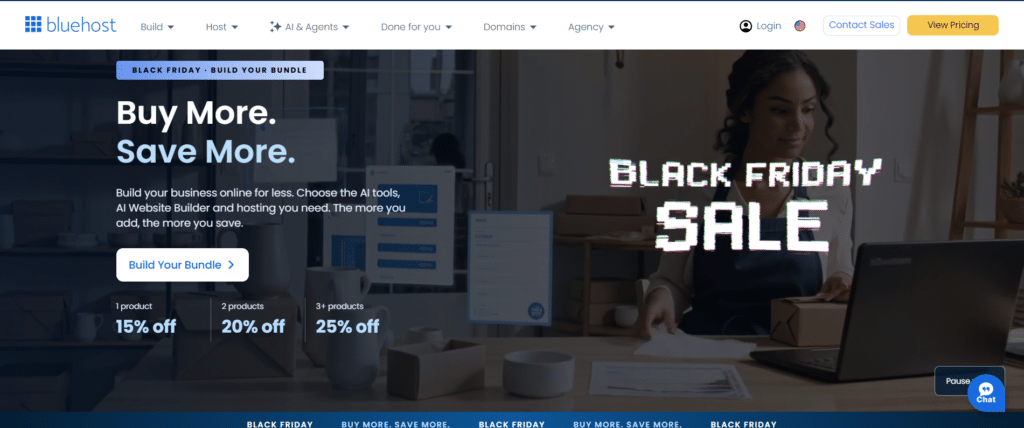
This 2026 Bluehost Black Friday deal is really straightforward. The bundle discount is calculated based on the number of eligible products in your cart. Buy one qualifying product on a 12-month term and get 15% off; buy two and get 20% off; or buy three and get 25% off. The discount is applied automatically during checkout. You don’t need to add a promo code.
This structure rewards buyers who combine products, but the highest percentage does not automatically produce the lowest total cost. You still need to decide whether each product is worth paying for.
Here’s an example of the Bluehost's three discount tiers:
| Eligible products in your cart | Discount | Example purchase |
| One | 15% off | Shared hosting |
| Two | 20% off | Shared hosting + AI Website Builder |
| Three | 25% off | Shared hosting + eligible AI product + Yoast SEO AI+ |
All qualifying products must meet the promotion's 12-month term requirement. Check the product-specific terms before assuming that every hosting plan or add-on qualifies.
Three practical ways to use the offer
- Example 1: one product = 15% off. Buy shared hosting only. A Starter plan on a 12-month term earns 15%. This fits a first blog where you are still testing an idea. Start small.
- Example 2: two products = 20% off. Pair shared hosting with the AI Website Builder. The two products earn 20%. This fits a publisher who wants AI-assisted site building from day one.
- Example 3: three products = 25% off. Combine shared hosting, the AI All-Access Pack and the AI Website Builder. Three eligible products on 12-month terms earn 25%. Use all three or buy fewer.
Where Yoast SEO AI+ fits. Yoast SEO AI+ sits outside these tiers. Bluehost runs it as a separate promotion: 30 days free with a shared hosting purchase, then $3.99/month. It does not count as one of your three products.
Don't add a product just to reach 25%. The jump from 20% to 25% is five points. Before you add a third product, ask one question: would I buy this at full price within the next 12 months? If yes, add it. If no, skip it. I'd rather see you pay for two tools you use than three where one sits idle.
Check the cart before you pay. The discount must appear in your cart before payment. If the line is missing, go back to the pricing page and confirm every product shows a 12-month term. Don't pay until it appears.
Who Should Buy Bluehost During Black Friday?
Bluehost's Black Friday offer makes the most sense for people launching a new website who want an introductory hosting price and the option to add AI tools. It is less suitable for buyers who need month-to-month hosting, expect a promotional rate on an existing plan, or cannot afford the regular renewal price.
Here’s how to decide whether the offer fits your situation:
Buy it if:
- You are launching a WordPress blog, niche site, portfolio, local-business site or affiliate site.
- You want a free first-year domain, SSL, malware scanning, weekly backups, CDN, caching and 24/7 chat support included with your hosting.
- You want to test a site for one year before committing to a longer hosting term.
- You want an AI-assisted site-building workflow with the AI Website Builder or the AI All-Access Pack.
- You plan to add Yoast SEO AI+ for on-page SEO and AI brand-visibility tracking.
Skip it if:
- You need a monthly hosting plan. The promotion applies to 12-month terms only.
- You are an existing Bluehost customer who expects the promotional rate on a current plan. The offer applies to new customers on the initial term.
- You need guaranteed high-performance infrastructure for a large, high-traffic site. Compare Bluehost's advanced hosting and other providers first.
- You are unwilling to budget for renewal. Starter renews at $11.99/month on the 12-month term.
My recommendation: If you're starting a straightforward WordPress blog or affiliate site, compare Bluehost Starter first. Move to Business when its additional security, website capacity, or support features justify the cost. Choose eCommerce Essentials when you need its commerce features for selling products, memberships, or subscriptions.
Buy the plan that fits your website today, with enough room in your budget to maintain it next year.
Disclosure: This page contains affiliate links. We may earn a commission at no extra cost to you.
What are the Best Bluehost Black Friday Bundles?
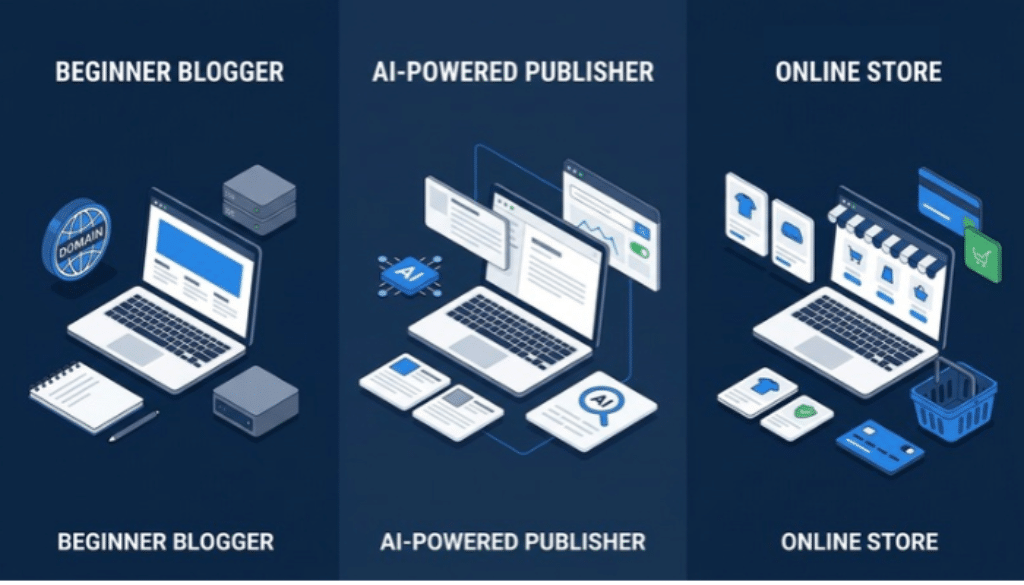
The best Bluehost Black Friday bundle depends on what you’re building, which tools you’ll use, and how much you want to spend after the promotional period. Beginners can start with hosting alone, AI-powered publishers can combine hosting with useful creation and optimization tools, and online sellers can choose a plan designed for eCommerce.
Here are three bundles worth considering during the 2026 sale.
Bundle 1: Best for Beginner Bloggers
Shared Starter + free first-year domain (15% tier)
- Best for: your first WordPress blog, niche site or portfolio.
- Why it works: Starter covers 10 websites on 10 GB of NVMe storage and includes a free first-year domain, SSL, malware scanning, weekly backups, a CDN, caching, and 24/7 chat support.
- Recommended reader: someone launching a first site and validating an idea.
Bundle 2: Best for AI-Powered Publishers
Shared hosting + AI All-Access Pack + AI Website Builder (25% tier)
- Best for: creators who want to build, publish, and optimize from one workflow.
- Why it works: three eligible products on 12-month terms reach the 25% tier. Add Yoast SEO AI+ during its 30-day free trial for on-page SEO and AI Brand Insights. It sits outside the tier math.
- Important caveat: buy this only if you will use the AI tools. An idle tool costs you at renewal.
Bundle 3: Best for Online Stores
eCommerce Essentials + AI Store (20% tier)
- Best for: digital products, courses, memberships, subscriptions, or physical products.
- Why it works: eCommerce Essentials includes WooCommerce auto-install, secure payments, subscriptions, and memberships. Pairing it with the AI Store gives you two eligible products, which earns 20%.
Before you buy, compare the complete checkout total with the value you expect to get from each product. The best bundle is the one that supports your next business goal without adding unnecessary recurring costs.
Bluehost Shared Hosting Plans Compared
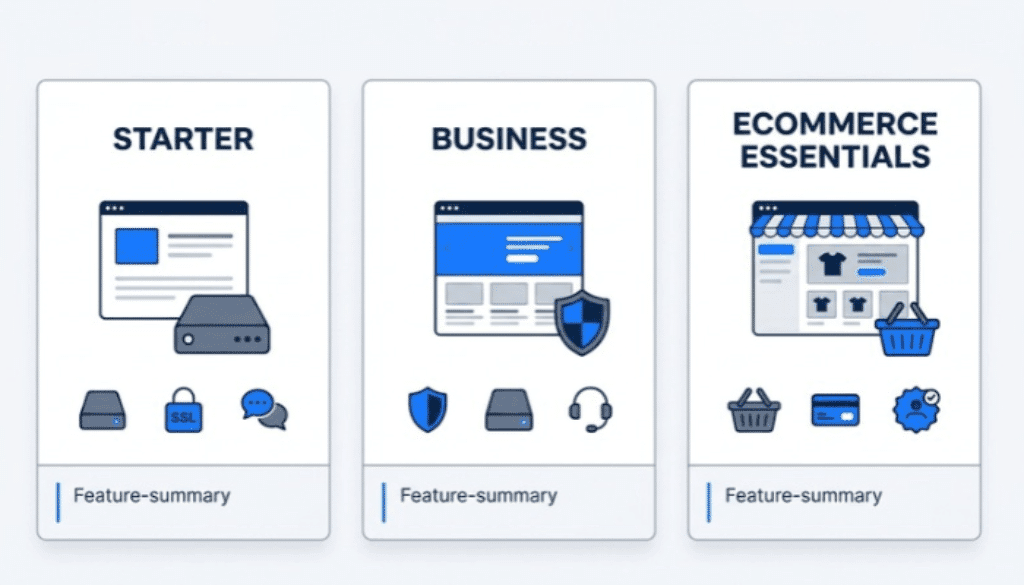
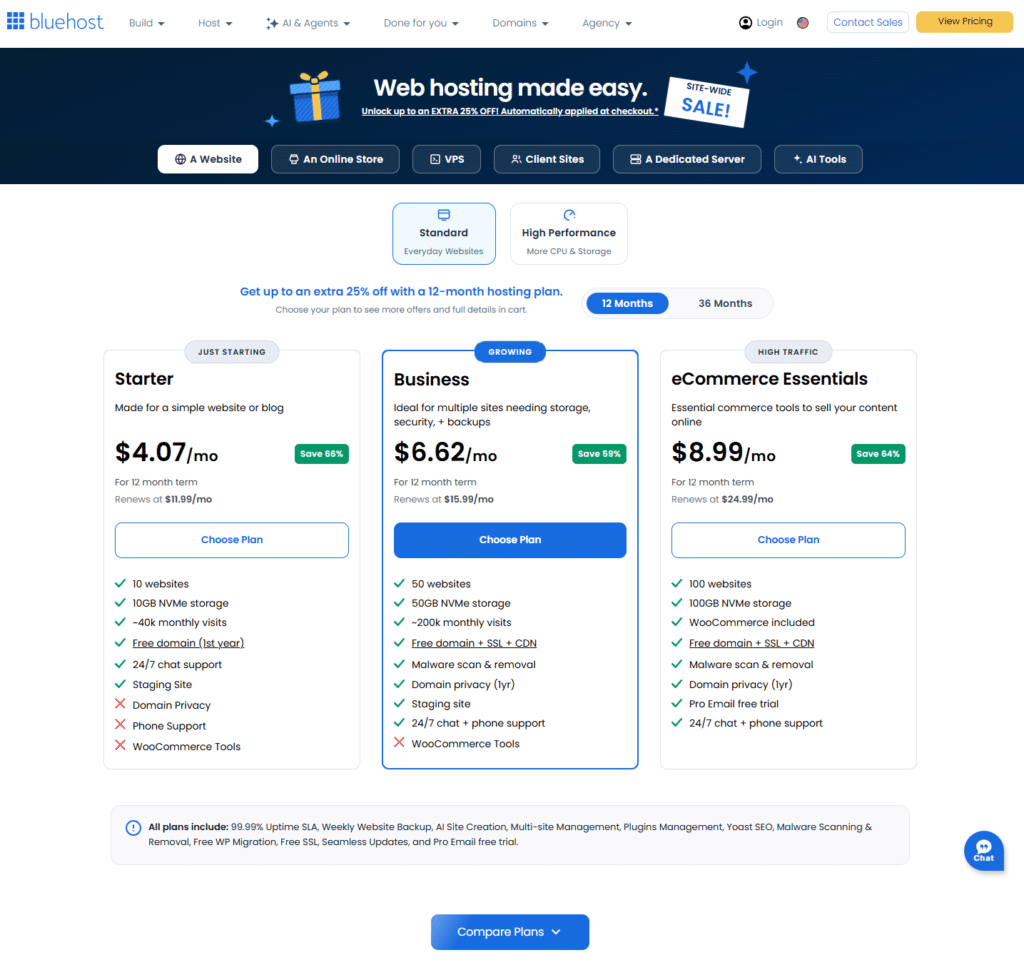
Throughout this article, I have referred to Bluehost’s Starter, Business, and eCommerce Essentials plans. Each of these refers to Bluehost’s hosting packages, and they differ in website capacity, storage, security features, support options, and commerce tools. Starter is the simplest choice for a basic website, Business adds security and support features, and eCommerce Essentials is the plan to consider for selling online.
Use this comparison to decide which plan deserves a closer look before applying the Black Friday discount.
| Feature | Starter | Business | eCommerce Essentials |
| Websites | 10 | 50 | 100 |
| NVMe storage | 10 GB | 50 GB | 100 GB |
| Ideal monthly visits | About 40,000 | About 200,000 | About 400,000 |
| WAF and DDoS protection | No | Yes | Yes |
| 24/7 chat support | Yes | Yes | Yes |
| Phone support | No | Yes | Yes |
| Free first-year domain | Yes | Yes | Yes |
| Free first-year domain privacy | Not listed | Yes | Yes |
| Commerce tools | Not included | Not included | WooCommerce auto-install, secure payments, subscriptions, and memberships |
Plan features and visit figures are based on Bluehost's published plan details. Confirm the current specifications and eligibility on Bluehost’s website before purchasing, as plan details can change.
Which Bluehost plan should you choose?
These are my plan recommendations depending on your situation right now:
- Choose Starter if: you are launching one simple blog or website and do not need phone support.
- Choose Business if: you run a lead-generation site, accept third-party payments, or want WAF and DDoS protection and phone support.
- Choose eCommerce Essentials if: you will sell products, memberships, subscriptions or courses.
My advice: start on Starter and upgrade after the idea proves out.
Is Bluehost Starter or Business better for affiliate marketing?
For a new affiliate website with straightforward hosting needs, Starter is usually the more sensible place to begin. Business is worth evaluating if you need its additional security features, phone support, or greater capacity.
Your affiliate strategy matters, too. A small content site with modest traffic has different requirements from a portfolio of sites attracting substantial traffic or supporting more complex business operations.
My advice: Choose the lowest plan that comfortably supports your current requirements, then upgrade when you have a clear reason. Before committing, compare the initial promotional price with the renewal rate and the cost of any additional tools you expect to need.
What’s Included Beyond the Bluehost Black Friday Discount?
Bluehost’s value extends beyond its promotional price. Depending on the eligible plan, the hosting package includes a first-year domain offer, SSL, malware scanning, weekly backups, NVMe storage, CDN, caching, and customer support. These features can reduce the number of separate services a new website owner needs to arrange, although each has limits and conditions.
Here’s what to understand before deciding whether the offer fits your needs.
Free domain for the first year
Eligible hosting plans include a free domain for the first year, subject to Bluehost’s terms. You must redeem the offer within 90 days, and premium domains are excluded.
A free domain reduces your initial setup costs, but it is a temporary benefit. After the first year, the domain renews at Bluehost’s then-current rate. Check the renewal price and eligible extensions before selecting your domain.
If you already own a domain, compare the benefits of registering a new one with the steps and costs involved in connecting your existing domain to your Bluehost account.
SSL, malware scanning, and weekly backups
Bluehost’s supplied plan information lists SSL, malware scanning, and weekly backups across the hosting plans covered by this guide.
- SSL: Helps encrypt data exchanged between a website and its visitors.
- Malware scanning: Helps identify potential malware-related issues. Scanning should be treated as one part of a wider website security routine.
- Weekly backups: Provide a recovery point for supported website data, depending on the service’s terms and limitations.
These features are useful, but they do not eliminate the need to maintain WordPress, themes, and plugins. Keep your software updated, use strong account credentials, and understand how to restore a backup if something goes wrong. Before relying on the included backups for a business-critical website, check their scope, retention, and restoration process.
NVMe storage, CDN, and caching
The listed plans use NVMe storage, with capacity varying by tier. Starter includes 10 GB, Business includes 50 GB, and eCommerce Essentials includes 100 GB in the supplied comparison.
Bluehost also lists CDN and caching features. A content delivery network can help serve website assets from distributed locations, while caching can reduce the need to regenerate pages for every request. Together with suitable hosting resources, these features can support a responsive website.
They are only part of the performance picture. Large images, poorly optimized plugins, complex themes, and inefficient scripts can still slow down a website. Choose your plan based on your needs and pay attention to the way you build and maintain your site.
99.99% shared-hosting uptime SLA
Bluehost’s supplied information lists a 99.99% shared-hosting uptime service-level agreement (SLA). An SLA describes a provider’s stated service commitment and any conditions attached to it.
Do not treat the figure as a guarantee that your site will never experience downtime. Review the applicable SLA terms, including how uptime is measured and what remedies or exclusions apply. Website availability can also be affected by maintenance, software problems, configuration errors, and services outside the hosting provider’s control.
24/7 customer support
All three plans in the supplied comparison include 24/7 chat support. Business and eCommerce Essentials also list phone support.
This difference may matter if you prefer speaking with a support representative or expect to need help with hosting-related questions. Still, support availability does not mean every WordPress design, plugin, or third-party service issue will be covered. Check the support scope if you expect hands-on help with a complex site.
Free Site Migration Tool for eligible WordPress sites
Bluehost provides a Site Migration Tool for eligible WordPress websites, which may simplify moving an existing site to a new hosting account.
Migration is not always a single-click process. Depending on your setup, domain configuration and email settings may require separate attention. Before changing hosts, make sure you have a current backup, confirm that your site qualifies for the tool, and review any instructions Bluehost provides for completing the move.
If your website supports sales, lead generation, or an active email list, plan the migration carefully to reduce the risk of disruption.
30-day money-back guarantee, with exclusions
Eligible new hosting purchases are covered by a 30-day money-back guarantee, subject to Bluehost’s terms. This can reduce the risk of trying a hosting plan, but it does not mean every charge is refundable.
Domain fees, most add-ons, and other excluded services may be non-refundable. If your plan includes a free domain and you cancel, a non-refundable domain fee may be deducted from the refund. Check the current refund policy before checkout, especially if you add AI tools or other extras to your purchase.
What should you check before paying?
Use this quick checklist to avoid surprises:
- Confirm that your selected plan and any additional products qualify for the Black Friday offer.
- Check that the advertised discount appears in the checkout total.
- Review the initial term, renewal rate, and domain renewal terms.
- Verify which security, backup, migration, and support features are included.
- Read the refund conditions for hosting and any add-ons.
- Remove any product you don’t expect to use.
The discount helps with the upfront cost; the included features and renewal terms determine whether the hosting remains a good fit over time. Take a few minutes to check both before completing your purchase.
How to Claim the Bluehost Black Friday Deal
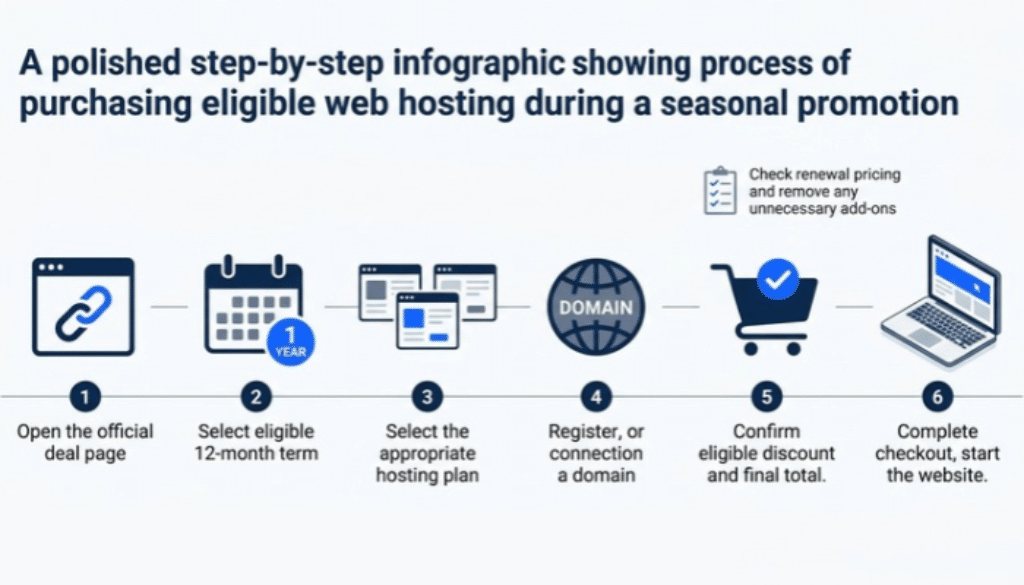
As you have seen in this article already, claiming the Bluehost Black Friday 2026 deal is straightforward: choose an eligible hosting plan, select the required 12-month term, and verify that the discount appears in your cart before paying. You don’t need a promo code for the official offer. The most important step is checking the final price and removing products you don’t need.
Follow these steps to complete your purchase.
- Click the link. Use the Get the Bluehost Black Friday Deal button on this page.
- Select the 12-month term. The sale discount applies only to eligible 12-month purchases.
- Choose your plan. Starter, Business or eCommerce Essentials.
- Set up your domain. Register a free first-year domain, connect an existing domain, or choose your domain later.
- Review the cart. Confirm the discount line appears.
- Remove add-ons you do not need.
- Note the renewal price. Write it down before you pay.
- Complete checkout. Start building with WordPress or Bluehost's AI site-creation tools.
If the discount does not appear: return to the pricing page, confirm the 12-month term, and review the cart again before paying. Don't pay until the line shows.
Final Recommendation: Which Bluehost Black Friday Deal Should You Choose?
The best Bluehost Black Friday deal is the one that gives your website the hosting and tools it needs at a cost you can sustain after the promotional period. For most beginners, that means starting with a suitable hosting plan, checking the renewal rate, and adding optional products only when they serve a clear purpose.
Here’s our recommendation based on your goals:
- Best for most beginners: Bluehost Starter on a 12-month term.
- Best for growing publishers: Business hosting.
- Best for sellers: eCommerce Essentials.
- Best value bundle: hosting plus the AI All-Access Pack and the AI Website Builder for the 25% tier, but only if you will use all three. Yoast SEO AI+ comes along as a free 30-day trial.
- Best timing: buy when the cart discount is visible. No separate Cyber Monday price cut is coming.
Our final advice is simple: choose your hosting plan first, add useful tools second, and judge the deal by its total cost and practical value. A discount should help you build your website, not encourage you to buy products you don’t need. And ensure you buy before November 30 to enjoy the discount.
Disclosure: This article contains affiliate links. We may earn a commission if you purchase through our links, at no additional cost to you.
Bluehost Black Friday FAQ
Do I need a Bluehost promo code?
No. Bluehost’s 2026 Black Friday promotion does not require a promo code. The discount should be applied in the cart when you select eligible products on the required 12-month term. Check the final order summary before paying.
When does the Bluehost Black Friday sale end?
The sale runs through November 30, 2026. Bluehost presents Black Friday and Cyber Monday as part of the same promotion. Confirm the terms on the official website before checkout in case the offer changes.
Is the Cyber Monday price different from Black Friday?
No separate Cyber Monday price is specified in Bluehost’s published promotion terms. The same discount tiers apply throughout the sale: 15% off one eligible product, 20% off two, and 25% off three. Waiting until Cyber Monday does not guarantee additional savings.
Can existing Bluehost customers get the Black Friday price?
The promotional pricing is intended for eligible new-customer purchases, rather than automatically applying to an existing customer’s current plan. If you already use Bluehost, contact support to ask what pricing or upgrade options are available for your account.
Does the discount apply at renewal?
No. The promotional price applies to the eligible initial 12-month term. Renewals are billed at the applicable regular rate. Review the renewal terms in your cart before purchasing and set a reminder a few weeks before your renewal date.
Can I get a refund?
Eligible new hosting purchases are covered by a 30-day money-back guarantee, subject to the applicable terms. Domain fees, most add-ons, and other excluded services may be non-refundable. If your hosting plan included a free domain, a non-refundable domain fee may be deducted from your refund. Read the refund policy before purchasing, particularly if you add other products to your order.